Using Excel well does not just mean knowing the menus or clicking in the right spots. It means, above all, understanding how a spreadsheet thinks when executing a calculation. And it all starts there: with the four fundamental operations and the order in which they are executed.
If these basics are solid, creating effective and precise formulas becomes much simpler. If you start in a confused way, however, even an apparently simple formula can return an incorrect result.
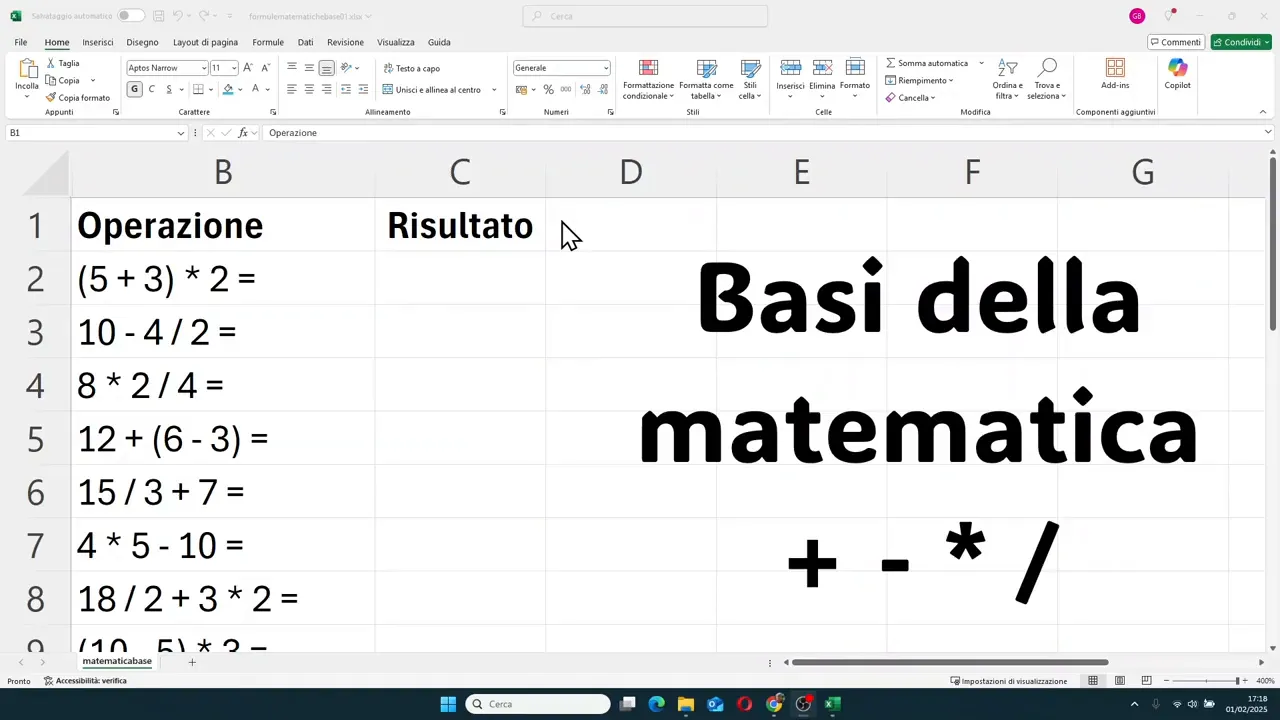
Table of contents
- 🧮 The mathematical symbols Excel really understands
- 📐 The most important rule: the order of operations
- 🔢 Practical examples to understand precedence
- 🧠 When parentheses really change everything
- 📊 Other useful examples to keep in mind
- 📝 A practical rule about parentheses in Excel
- ⚠️ Common errors to avoid
- 🚀 Why these basics really make a difference
- ❓ Frequently Asked Questions
🧮 The mathematical symbols Excel really understands
The first thing to establish clearly is this: in Excel, the symbols for operations are not always the ones you use at school when writing by hand.
- Addition: use the + symbol
- Subtraction: use the - symbol
- Multiplication: use *, which is the asterisk
- Division: use /, which is the forward slash
Here are two very common errors:
- writing multiplication with an x
- writing division with a colon
In a spreadsheet, these do not function as mathematical operators. If you want to calculate correctly, you must get used to using the asterisk and the slash right away.
📐 The most important rule: the order of operations
Excel does not just execute calculations from left to right in every situation. It follows precise priorities.
The basic rule is this:
- first multiplications and divisions
- second additions and subtractions
When there are operations of the same level, for example only multiplications and divisions, or only additions and subtractions, then it proceeds in sequence.
And then there is an element that can change everything: parentheses. What is inside parentheses is executed before everything else.
🔢 Practical examples to understand precedence
Let's look at the most useful cases, those that really help avoid mistakes.
Addition inside parentheses and multiplication outside
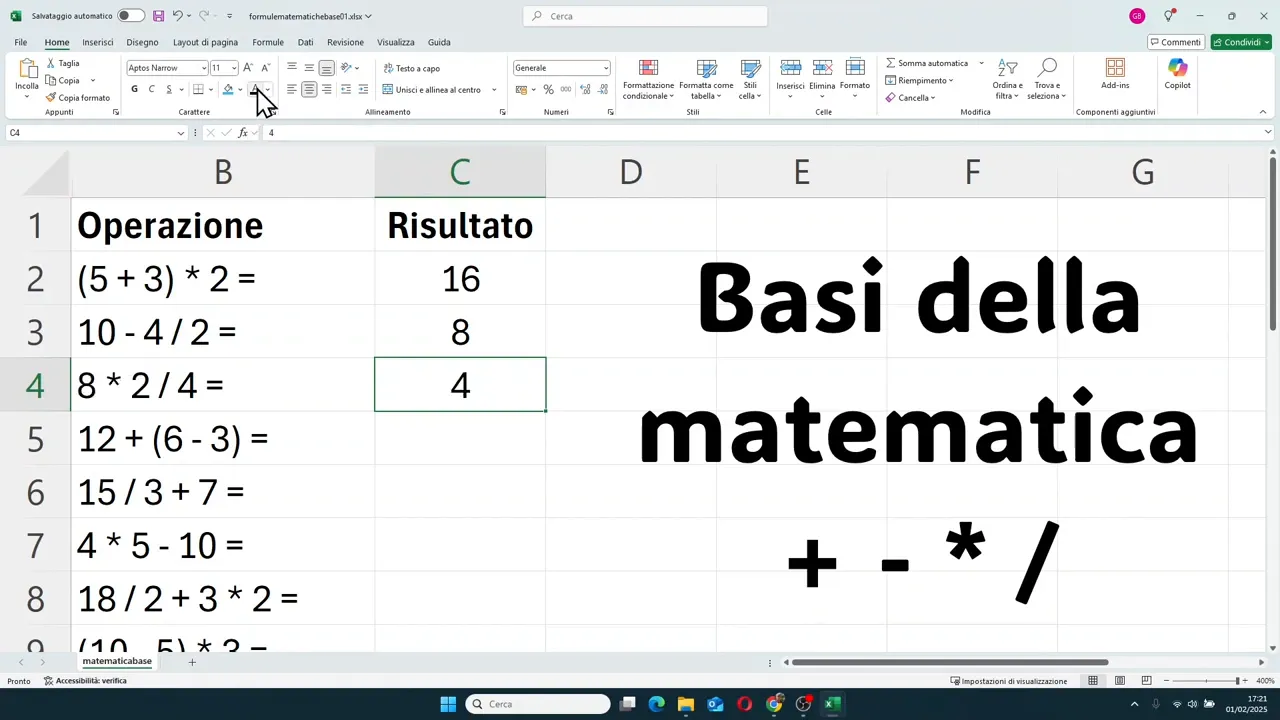
If you have (5 + 3) * 2, Excel first performs the addition inside the parentheses. You get 8, then multiply by 2 and the final result is 16.
Subtraction and division without parentheses
With 10 - 4 / 2, you do not calculate 10 minus 4 first. Excel performs the division first: 4 divided by 2 is 2. Only then does it subtract that result from 10. The final result is 8.
Multiplication and division in the same calculation
In the case of 8 * 2 / 4, multiplication and division have the same priority. So we proceed in order: 8 times 2 is 16, then 16 divided by 4 is 4.
Parentheses that do not change the outcome
An interesting case is 12 + (6 - 3). First you do the subtraction, you get 3, then you add 12 and you get 15.
But here is an important detail: even without parentheses, i.e., with 12 + 6 - 3, the result would still be 15. In situations like this, the parentheses are not essential.
Division before addition
With 15 / 3 + 7, division comes first. So 15 divided by 3 is 5, then you add 7 and you get 12.
Multiplication before subtraction
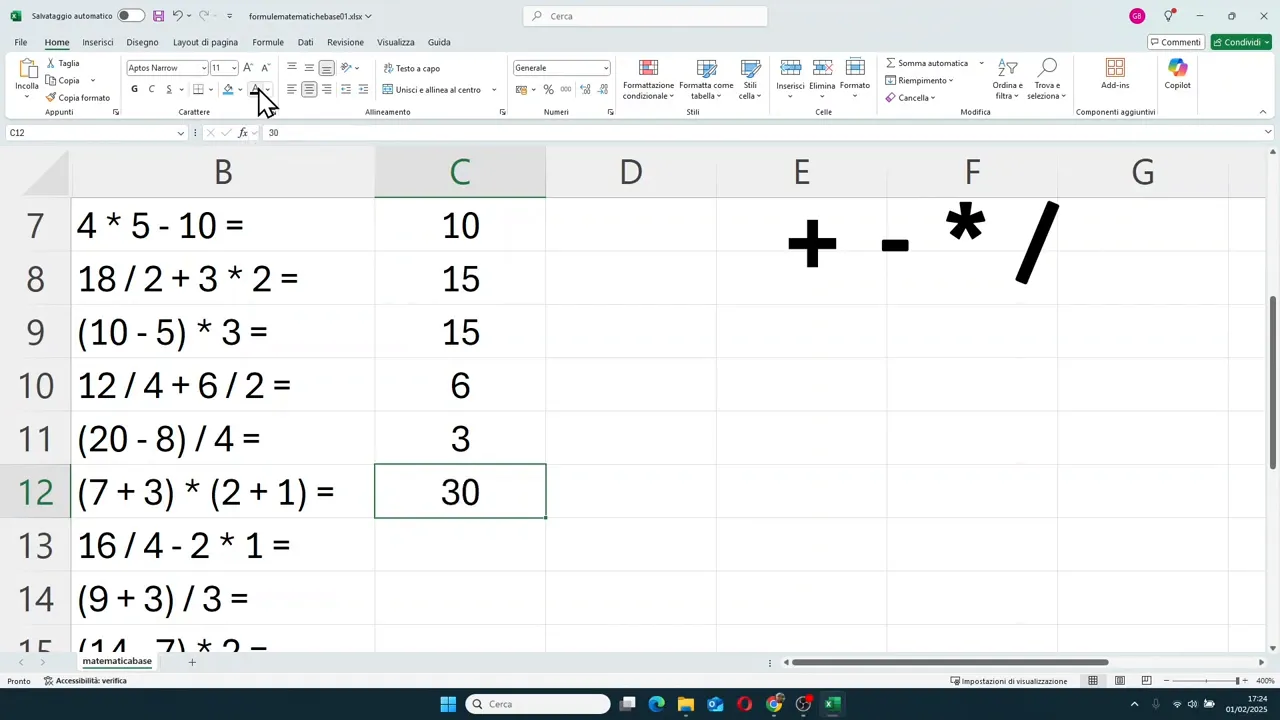
With 4 * 5 - 10, Excel first calculates 4 times 5, which is 20, and then subtracts 10. Result: 10.
Multiple priority operations in the same calculation
In 18 / 2 + 3 * 2, you must solve the division and multiplication first. So:
- 18 divided by 2 is 9
- 3 times 2 is 6
- 9 plus 6 is 15
🧠 When parentheses really change everything
Parentheses are used to tell Excel: do this part first. And in many cases, they make a massive difference.
A very clear example
Take (10 - 5) * 3. With the parentheses, you first do 10 minus 5 and get 5. Then you multiply by 3 and the result is 15.
Without parentheses, Excel would have performed the multiplication 5 times 3 first, getting 15, and then 10 minus 15, resulting in a completely different number.
Another classic case
With (20 - 8) / 4, the sheet first calculates 20 minus 8, which is 12, and then 12 divided by 4. The result is 3.
If the parentheses weren't there, Excel would start with 8 divided by 4 and only then subtract that value from 20.
Parentheses on both sides
In (7 + 3) * (2 + 1), the two groups are resolved first separately:
- 7 plus 3 is 10
- 2 plus 1 is 3
- 10 times 3 is 30
Parentheses before division
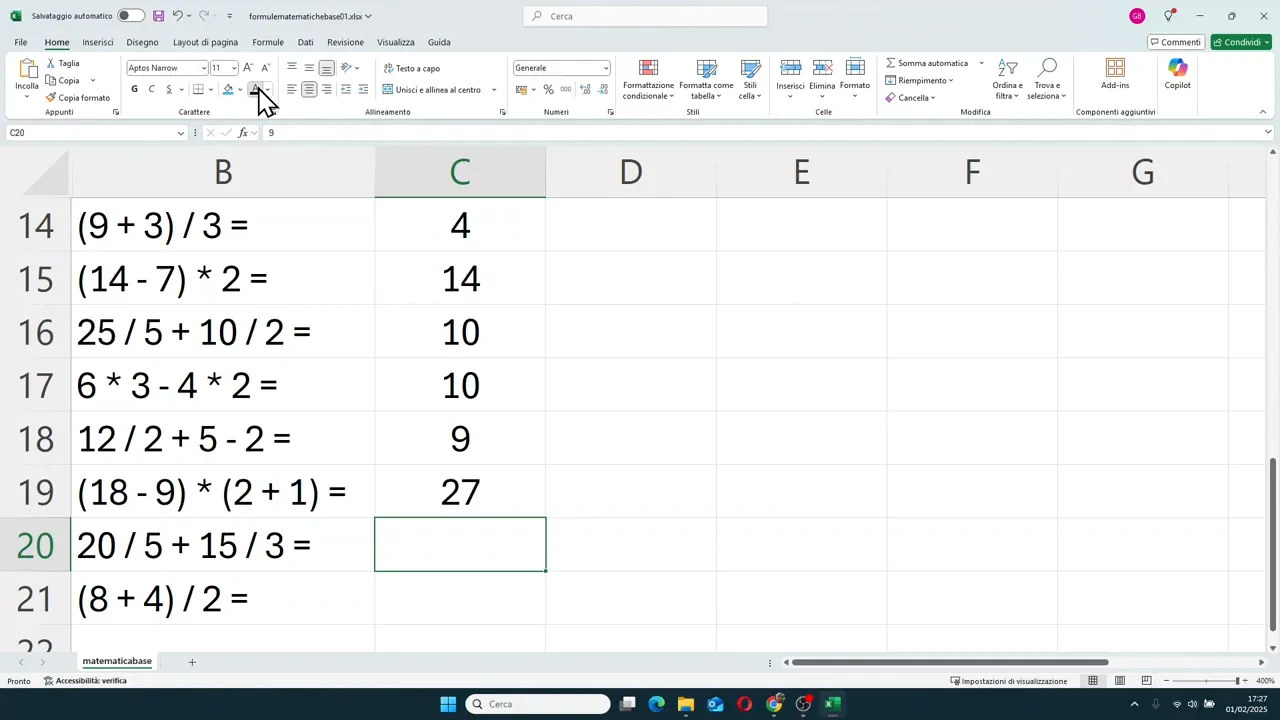
With (9 + 3) / 3, Excel first adds 9 and 3, gets 12, and only then divides by 3. The final result is 4.
Without parentheses, it would have been 3 divided by 3 first, and then 9 plus 1, resulting in a different outcome.
A final useful comparison
(8 + 4) / 2 gives 6, because first you get 12 and then divide by 2.
Instead, 8 + 4 / 2 gives 10, because division comes before addition. This comparison alone makes it clear why parentheses are so important.
📊 Other useful examples to keep in mind
Here is a series of calculations that help consolidate Excel's logic:
- 12 / 4 + 6 / 2 = 6, because both divisions are done first
- 12 / 4 * 6 / 2 = 9, because multiplications and divisions are resolved in order
- (7 + 3) / (2 + 1) = 3, because both parentheses come first
- 16 / 4 * 2 - 1 = 7, because you do division and multiplication first, then subtraction
- 6 * 3 - 4 * 2 = 10, because multiplications are resolved before subtraction
- 25 / 5 + 10 / 2 = 10, because 25 divided by 5 is 5 and 10 divided by 2 is 5
- (18 - 9) * (2 + 1) = 27, because the two parentheses produce 9 and 3, then you multiply
- 20 / 5 + 15 / 3 = 9, because you get 4 and 5 and then add them
📝 A practical rule about parentheses in Excel
There is a very useful habit to develop: use parentheses only when they are really needed.
Adding too many doesn't automatically make the formula better. In fact, it often makes it harder to read and check. If a parenthesis doesn't change the order of operations, in most cases it's better to avoid it.
There is also another feature to remember: in Excel, you use only round parentheses. You do not work with square brackets or curly braces as might happen in other mathematical or programming contexts.
If you need more complex structures, you can insert multiple round parentheses, even one inside another.
⚠️ Common errors to avoid
Those who start using mathematical formulas in Excel almost always trip up on the same points. It's better to know them right away.
- Using x instead of the asterisk to multiply
- Using a colon instead of the forward slash to divide
- Calculating from left to right without respecting priorities
- Ignoring the effect of parentheses
- Inserting useless parentheses that complicate reading the formula
If you avoid these errors, you have already built a much more solid foundation than it seems.
🚀 Why these basics really make a difference
A spreadsheet is made to process data, but the quality of the results always depends on how you write the formulas. And to write them well, you need one very simple thing: knowing what you are asking Excel to do.
The four fundamental operations are not a school detail left behind years ago. They are the heart of everything you will do next, from the simplest formulas to the most structured calculations.
When you are clear about symbols, precedence, and parentheses, Excel stops looking unpredictable and starts to become a precise, consistent, and reliable tool.
❓ Frequently Asked Questions
What symbol is used to multiply in Excel?
The asterisk (*) is used, not the letter x.
What symbol is used to divide in Excel?
The forward slash (/) is used, not the colon.
Does Excel always execute calculations from left to right?
No. First it executes multiplications and divisions, then additions and subtractions, unless parentheses impose a different order.
Are parentheses always necessary?
No. You should use them when they are really needed to change or clarify the order of operations. If they add nothing, it's often better to avoid them.
What type of parentheses are used in Excel?
In Excel, round parentheses are used. If the formula is more complex, you can nest them inside one another.
Why might an Excel formula give a different result than what I expected?
In most cases, the problem lies in the order of operations or the incorrect use of symbols. Check these two aspects first.